Skip to Content
Service offering

SAP Cloud Connector

SAP Cloud Connector is the reverse-proxy gateway that bridges your on-premise SAP systems with SAP BTP — without opening inbound firewall ports. We handle everything: from provisioning and hardening the virtual machine where the connector runs, through HA master/shadow configuration, system mapping, principal propagation, and ongoing certificate and lifecycle management.
Cloud Connector (SCC)VM Provisioning & ManagementHA Master / ShadowSystem MappingPrincipal PropagationAccess Control (Whitelist)RFC · HTTPS · LDAP · TCPCertificate LifecycleAudit LoggingSAP Cloud ALM Integration
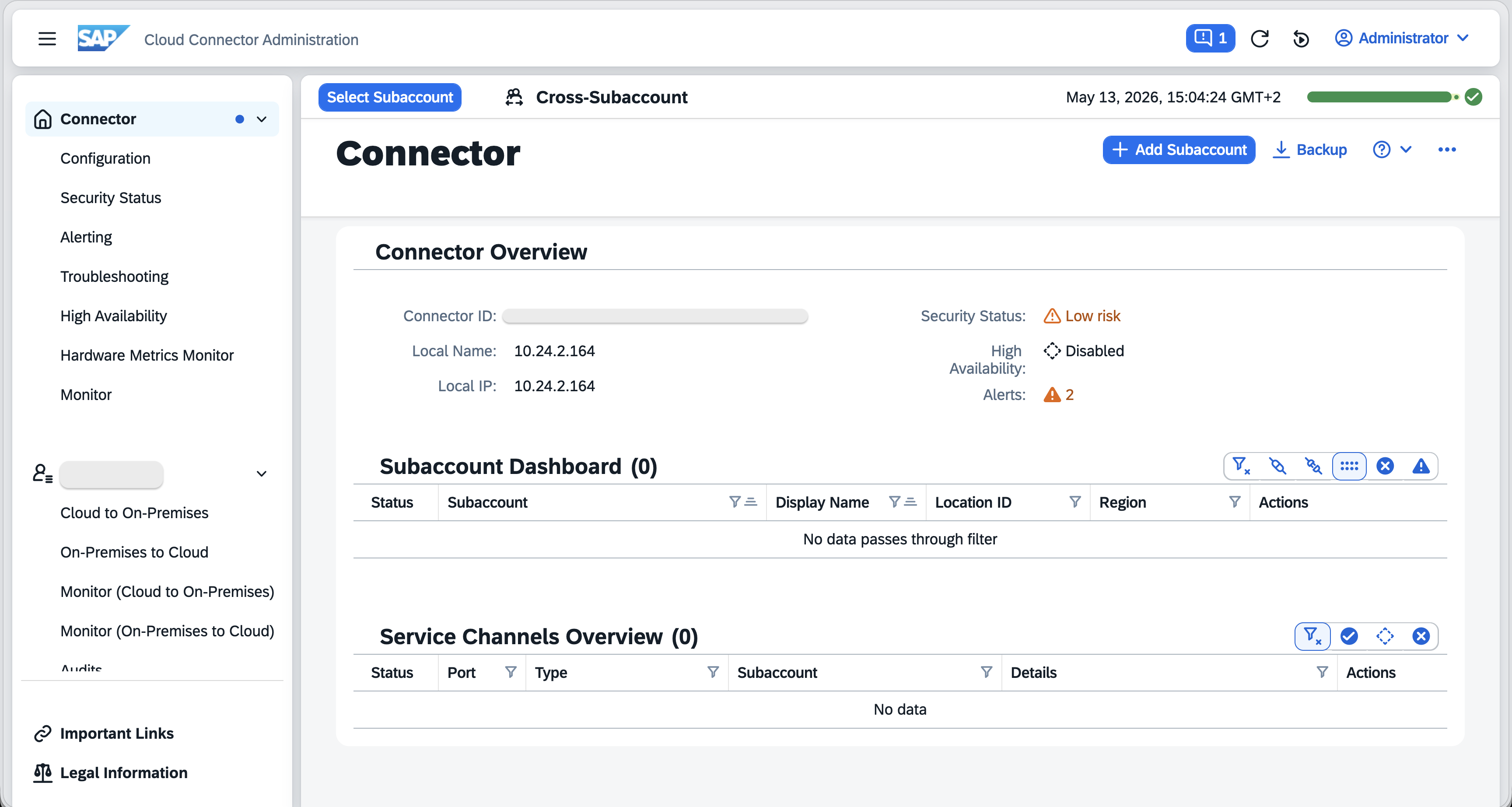
SAP Cloud Connector — administration console

How Cloud Connector Works — The Outbound Tunnel

Cloud Connector’s fundamental design is outbound-only: the connector, running inside your corporate network, initiates an outbound HTTPS connection to SAP BTP. BTP then uses this established tunnel to route requests from cloud applications back to on-premise systems — without any inbound firewall rules, DMZ exposure, or open server ports.

Cloud Connector tunnel architecture — outbound-only, no inbound firewall rules required
SAP BTP (Cloud)
BTP Connectivity ServiceBTP Destination ServiceCloud Integration (CPI) iFlowsBTP CAP ApplicationsSAP Build Work Zone
↑ outbound HTTPS tunnel (port 443) — initiated by Cloud Connector ↑
DMZ / Perimeter Network — Cloud Connector VM
SCC Master (active)SCC Shadow (standby)Java runtime (OpenJDK)Admin console (HTTPS :8443)Virtual host mapping (internal → virtual)Resource access control (whitelist)Audit log & certificate store
↕ internal network — RFC · HTTPS · LDAP · TCP · JDBC
Internal Network — On-Premise Systems
SAP S/4HANA (ABAP · OData · RFC)SAP ECC / NetWeaverSAP HANA On-Premise (JDBC)Microsoft Active Directory (LDAP)Custom on-premise services (HTTP · TCP)

No inbound ports are required. The corporate firewall only needs to permit outbound HTTPS (port 443) from the SCC host to SAP BTP’s published IP ranges. All request traffic from BTP to on-premise travels back through this persistent, TLS-encrypted tunnel. Cloud Connector can be connected to multiple BTP subaccounts simultaneously — each subaccount sees a separate, independently controlled tunnel.

High Availability — Master / Shadow

A single Cloud Connector instance is a single point of failure for all BTP-to-on-premise connectivity. Production landscapes must run a Master / Shadow pair to ensure automatic failover without manual intervention.

Master Instance
Active — Holds the Live BTP Tunnel

The master is the active node. It establishes and maintains the HTTPS tunnel to BTP, serves all traffic from BTP to on-premise systems, and is the source of truth for configuration. All administrative changes are made on the master and automatically synchronised to the shadow.

  • Holds the active BTP subaccount connection
  • Processes all tunnelled requests
  • Synchronises configuration to the shadow
  • Runs the administration console
  • Generates audit log entries for all access
Shadow Instance
Standby — Automatic Failover

The shadow passively monitors the master via a heartbeat. If the master becomes unavailable, the shadow automatically promotes itself to master, establishes its own BTP tunnel, and resumes traffic — typically within seconds. The shadow should run on a separate physical or virtual host for meaningful redundancy.

  • Receives configuration sync from the master
  • Maintains its own outbound HTTPS connection to BTP
  • Promotes automatically when master heartbeat is lost
  • No traffic flows through shadow unless promoted
  • Should run on a separate host / availability zone
HA failover sequence
Master (active)Tunnel live · serving traffic
Master failureHost down · process crash · network loss
Shadow detectsHeartbeat timeout exceeded
Shadow promotesEstablishes own BTP tunnel
Shadow (now master)Traffic resumes · no manual action

System Mapping & Access Control

These two mechanisms are the foundation of Cloud Connector’s security model — they control precisely which on-premise systems and resources are reachable through the tunnel.

System Mapping
Virtual Host → Real Internal Host
Cloud Connector maps a virtual hostname (visible to BTP consumers, e.g. s4hana-prod) to the actual internal hostname (e.g. sapapp01.corp.internal:44300). BTP Destinations reference only the virtual hostname — the real internal network structure is never exposed to the cloud side. Each mapped system also specifies the allowed protocol (HTTP, RFC, LDAP, TCP).
Virtual host + virtual port → internal host + internal port · protocol type · BTP Destination proxy type: OnPremise
Resource Access Control
Explicit Whitelist — Deny by Default
After a system is mapped, access to specific resources must be explicitly whitelisted. For HTTP/OData systems: URL path prefixes (e.g. /sap/opu/odata/). For RFC systems: individual function module names. For LDAP: base DNs. Anything not on the whitelist is blocked by the Cloud Connector — even if BTP attempts to call it. This deny-by-default posture is a key security control.
HTTP: path prefix rules · RFC: function module names · LDAP: base DN · exact / prefix matching · audit logged per access
Multi-Subaccount
One SCC, Multiple BTP Subaccounts
A single Cloud Connector can be simultaneously connected to multiple BTP subaccounts (e.g. DEV, TEST, PROD). Each subaccount gets its own tunnel and its own system mapping configuration — the DEV subaccount sees only DEV-mapped systems, PROD only PROD-mapped systems. No cross-subaccount access leakage.
Per-subaccount system mapping · independent access control lists · separate audit logs per subaccount
Audit Logging
Every Tunnelled Request Recorded
Cloud Connector logs every inbound request — caller identity, target virtual host, resource accessed, timestamp, and result. The audit log is stored locally on the SCC host and can be forwarded to a SIEM. Logs are the primary evidence source for compliance reviews, incident investigations, and access audits.
Local audit log file · syslog forwarding · per-subaccount log separation · configurable retention · SIEM export

Principal Propagation

Principal Propagation allows a BTP application or CPI iFlow to forward the authenticated end user’s identity to an on-premise ABAP system — so that the ABAP authorization layer (PFCG roles, object-level checks) can enforce fine-grained access control based on the actual user, not a shared technical account.

Principal Propagation flow — user identity forwarded to on-premise via X.509 certificate
End UserAuthenticated via IAS · carries JWT / SAML token
BTP App / CPICalls on-premise via Destination (PrincipalPropagation auth)
BTP Connectivity ServiceExtracts user principal from token
Cloud ConnectorIssues short-lived X.509 cert for the user
ABAP SystemValidates cert · maps to ABAP user · runs auth checks

Setup requirements on the ABAP side:

  • The SCC CA certificate must be trusted in ABAP transaction STRUST (SSL client identity)
  • A certificate-to-user mapping rule must exist in ABAP (transaction CERTRULE or ICM configuration) — mapping the CN of the short-lived cert (which carries the user’s email or login name) to an ABAP user
  • The ABAP system must have the Cloud Connector’s virtual host registered and the relevant OData or RFC service activated

Without principal propagation, all BTP-to-on-premise calls use a shared technical user — meaning ABAP cannot distinguish which end user triggered the request. With it, every call carries the user’s identity and ABAP enforces its full authorization model.

Supported Protocols

Cloud Connector can tunnel six protocol types — each mapped at the system level with its own access control configuration.

HTTP / HTTPS
REST, OData, SOAP
Most common protocol. Covers OData V2/V4, REST APIs, SOAP web services, and custom HTTP endpoints. Access controlled by URL path prefix whitelist. Used by CPI iFlows, BTP CAP apps, and Work Zone content providers to call ABAP OData services.
RFC
SAP Remote Function Calls
Enables BTP apps and CPI to call ABAP function modules (BAPIs, RFMs) via the RFC protocol. Access controlled by individual function module name whitelist. Requires the JCo (Java Connector) library in the consuming application.
LDAP
Directory Services
Tunnels LDAP queries to on-premise Active Directory or other LDAP directories. Used for user lookups, group membership queries, and identity resolution from BTP applications. Access controlled by base DN whitelist.
TCP
Generic TCP
Raw TCP tunnel for protocols not natively supported (e.g. database-specific protocols, proprietary middleware). Provides maximum flexibility but least granular access control — use only where no higher-level protocol adapter exists.
JDBC
Database Connectivity
Enables direct database connections from BTP applications to on-premise databases (SAP HANA On-Premise, Oracle, MS SQL). Access controlled at the mapped system level. Used by CPI iFlows and BTP CAP services that need direct SQL access.
Mail (SMTP / IMAP)
On-Premise Mail Servers
Tunnels SMTP and IMAP connections to corporate mail servers that are not publicly reachable. Used by CPI iFlows that send email notifications through on-premise Exchange or Postfix servers rather than a cloud mail relay.

VM Infrastructure & Managed Hosting

Cloud Connector is not a BTP-hosted service — it is software that runs on a virtual machine you must provision and maintain within your network. Most customers handle the SCC Java configuration but underestimate the operational overhead of the underlying VM: OS patching, certificate lifecycle, monitoring, and SCC version upgrades.

CNBS delivers the complete stack — from VM provisioning and OS hardening through SCC installation to ongoing lifecycle management.

CNBS Unique Offering
Full VM + SCC Stack — Provisioned, Hardened, and Managed by CNBS

We provision the virtual machine, harden the operating system, install and configure the Cloud Connector (master + shadow), and provide ongoing lifecycle management — so your team does not need to run a dedicated SCC operations function. Cloud Connector becomes a fully managed component of your BTP connectivity layer, not an unowned server someone provisioned three years ago.

VM provisioning (Azure · AWS · on-premise)
OS selection & hardening (RHEL · SLES · Ubuntu)
Network & firewall rule design
OpenJDK installation & tuning
SCC installation (master + shadow)
HA failover testing & validation
OS patch management (scheduled)
SCC version upgrade management
Certificate lifecycle & renewal
VM monitoring (Azure Monitor / CloudWatch)
SAP Cloud ALM health integration
Incident response & runbooks

What We Deliver

VM Provisioning & OS Hardening

Virtual machine provisioning on Azure, AWS, or on-premise hypervisor (VMware/Hyper-V). OS selection and hardening: SELinux / AppArmor profiles, SSH key-only access, minimal installed packages, NTP configuration, and host-based firewall rules (iptables/firewalld). OpenJDK installation, JVM heap sizing, and startup service configuration (systemd).

HA Master / Shadow Installation

Cloud Connector installation on dedicated master and shadow hosts (separate VMs or availability zones). Subaccount trust setup and BTP connector registration, master-shadow pairing via certificate exchange, heartbeat configuration, and automatic failover validation by deliberately failing the master and confirming shadow promotion and traffic resumption.

System Mapping & Access Control

Virtual-to-real host mapping for each on-premise system (HTTP, RFC, LDAP, TCP, JDBC). Resource whitelist configuration: URL path prefixes for OData/REST services, individual RFC function module names for ABAP BAPIs. BTP Destination configuration with proxy type OnPremise and authentication method per use case. Per-subaccount mapping isolation for DEV/TEST/PROD.

Principal Propagation Setup

End-to-end principal propagation configuration: BTP Destination with PrincipalPropagation authentication type, Cloud Connector CA certificate export, ABAP STRUST configuration to trust the SCC CA, and CERTRULE / ICM certificate-to-user mapping in the ABAP system. Validated with a real end-user login trace confirming the ABAP authorization check runs against the actual user.

Security Hardening & Certificate Lifecycle

TLS configuration between SCC and BTP (pinned trust anchors), SCC administration console certificate renewal, backend system client certificate management, admin user governance (no shared admin accounts), and audit log configuration. Certificate expiry tracking with alerting — every certificate managed by CNBS has a renewal action scheduled before expiry.

Monitoring, Patching & Lifecycle Management

VM health monitoring via Azure Monitor, AWS CloudWatch, or SAP Cloud ALM. SCC process monitoring (auto-restart via systemd watchdog). Scheduled OS patching with maintenance windows. SAP Cloud Connector version upgrade management (SAP releases minor and major updates regularly — each tested in non-production before production promotion). Operational runbooks for every common task.

How Customers Benefit

Zero
Inbound Firewall Rules Required
The outbound-only tunnel design means no inbound ports need to be opened, no reverse proxies need to be published, and no DMZ rules need ongoing justification to your security team — the entire connectivity model is driven by an outbound HTTPS connection your firewall already permits.
Deny-All
Access Control by Default
Every on-premise resource is blocked by default. Only explicitly whitelisted URL paths, RFC function modules, and LDAP base DNs are reachable through the tunnel. BTP cannot reach anything you haven’t consciously approved — the access control model is conservative by design.
Full
ABAP Authorization for BTP Calls
Principal propagation ensures that every BTP-initiated call to S/4HANA carries the real end user’s identity. ABAP’s full authorization framework — PFCG roles, object-level checks — runs on the actual user, not a shared service account with excessive permissions.
Managed
VM + SCC as a Fully Operated Service
CNBS provisions the VM, installs SCC, manages OS patches, upgrades the connector software, renews certificates, and monitors health — your team does not need SCC-dedicated operations expertise. The connector is just infrastructure that works.
HA
Automatic Failover — No Manual Action
Master / Shadow HA eliminates the single point of failure for all BTP-to-on-premise connectivity. Shadow promotion is automatic — a VM reboot, process crash, or network partition on the master does not require an on-call engineer to restore connectivity.
Auditable
Every Request Logged
Cloud Connector’s audit log records every tunnelled request — caller, target, resource, and result. Combined with SIEM forwarding, this creates a complete evidence trail for compliance reviews, security incidents, and access audits without additional tooling.

How We Work

01

Assessment & Topology Design

We map your on-premise systems in scope, firewall rules, network topology, BTP subaccount structure, and HA requirements. We design the connector placement (DMZ vs internal segment), VM sizing, and per-subaccount system mapping strategy before any infrastructure is provisioned.

02

VM Provisioning & OS Hardening

We provision the master and shadow VMs (Azure, AWS, or on-premise), apply OS hardening baselines, configure host-based firewall rules, install OpenJDK with appropriate JVM heap sizing, and set up systemd service units for SCC auto-start and watchdog monitoring.

03

SCC Installation & BTP Trust

Cloud Connector installation, admin console certificate issuance, BTP subaccount connector registration, master-shadow pairing via certificate exchange, and initial connectivity validation. Each BTP subaccount (DEV, TEST, PROD) gets its own tunnel with isolated system mappings.

04

System Mapping & Whitelist Configuration

Virtual-to-real host mapping for every on-premise system, resource whitelist definition (URL paths, RFC function modules, LDAP DNs), and BTP Destination creation for each mapped system. Principal propagation configured end-to-end and validated with ABAP trace.

05

HA Validation & Security Hardening

Deliberate master failure test confirming shadow promotes and traffic resumes within the defined RTO. Security review: admin account governance, certificate expiry schedule, audit log configuration, SIEM forwarding, and access whitelist sign-off against your security team’s requirements.

06

Handover & Ongoing Operations

Operational runbooks for all common tasks (adding a new system mapping, renewing a certificate, upgrading SCC, performing a failover test). Monitoring dashboard handover, certificate renewal calendar, and patching schedule. CNBS remains available for lifecycle management under a managed services arrangement.


Ready to enable secure hybrid SAP connectivity?

Let’s build your secure bridge — and keep it running.

Tell us about your on-premise SAP systems, BTP subaccount structure, and HA requirements — we’ll design, provision, and manage a secure, stable Cloud Connector landscape from VM to tunnel.

Get in touch →